Quick Capture saves the current app’s content for later retrieval. Appshots attaches an app window to the current request; Quick Capture creates a knowledge-base item.
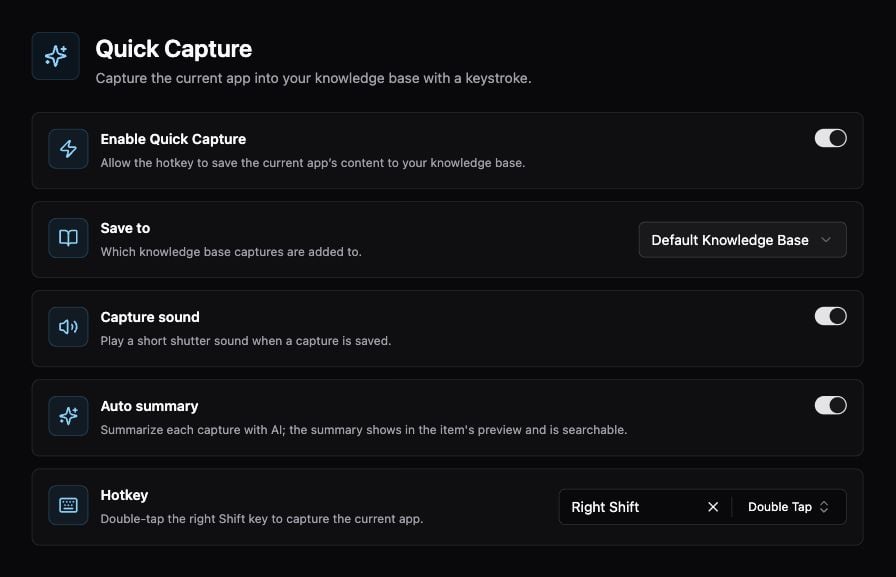
Quick Capture destination, sound, automatic summary, and hotkey controls

Quick Capture destination, sound, automatic summary, and hotkey controls.

Capture something worth keeping

  1. Open Settings → Memory → Quick Capture and enable it.
  2. Choose Save to, then review the Hotkey.
  3. Bring the app containing the content to the front.
  4. Invoke the hotkey.
  5. Open the destination knowledge base and check the saved item.

Options

Auto summary uses AI processing; review your model/provider configuration if you want to control where captured content is processed.

Troubleshooting

For missing or incomplete content, check Permissions, return to the intended app, and try a small, clearly visible example. Check the destination before assuming a capture was lost. Indexing and summary generation can finish after the initial capture. Related: Knowledge Base, Appshots, Voice Notes.