Open Settings → Speech Assets to manage vocabulary and speakers used by speech features.
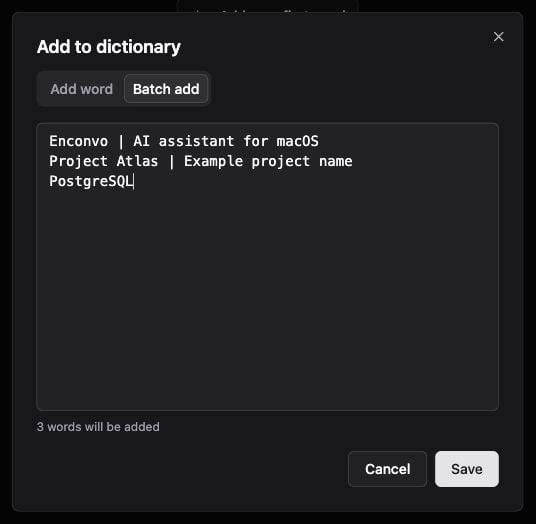
Batch dictionary draft using one term and optional description per line

Batch dictionary draft using one term and optional description per line.

Dictionary

Add product names, technical terms, acronyms, or unusual spellings to Dictionary. Each entry contains a word and an optional description.
  1. Open Dictionary and add an entry.
  2. Enter the preferred spelling and a short explanation if useful.
  3. Save it and try a short recording containing the word.
  4. Review the transcription; provider support and audio quality still affect recognition.
For batch entry, use one term per line. Separate its description with |:
Use search and edit controls to maintain the list. Batch deletion requires selecting the intended entries and confirming the action.

Speakers

Speakers manages known speaker names for recordings and transcripts. Review speaker assignments within a recording before renaming a speaker. A recognized voice or diarization label can be wrong, especially with overlapping speech.

Choose where to use them

Dictation, Meeting Recording, Transcription, and Live Captioning use different speech configurations. Check the provider settings for language hints, hot words, diarization, and other supported options rather than assuming all providers apply the same vocabulary behavior.

Watch the steps

Enter a term and description, switch to Batch add, and enter three example lines. The draft is discarded; no dictionary entry is saved. This silent walkthrough uses real interface captures with pauses added for reading. The written steps above provide the same instructions.