> ## Documentation Index
> Fetch the complete documentation index at: https://docs.enconvo.ai/llms.txt
> Use this file to discover all available pages before exploring further.
# Screen Doodle
> Mark up a screen region and attach it to the Dynamic Island.
Screen Doodle lets you point out a part of the screen before asking your Agent about it. The confirmed annotation becomes an image attachment in the Dynamic Island.
 ## Mark up your screen
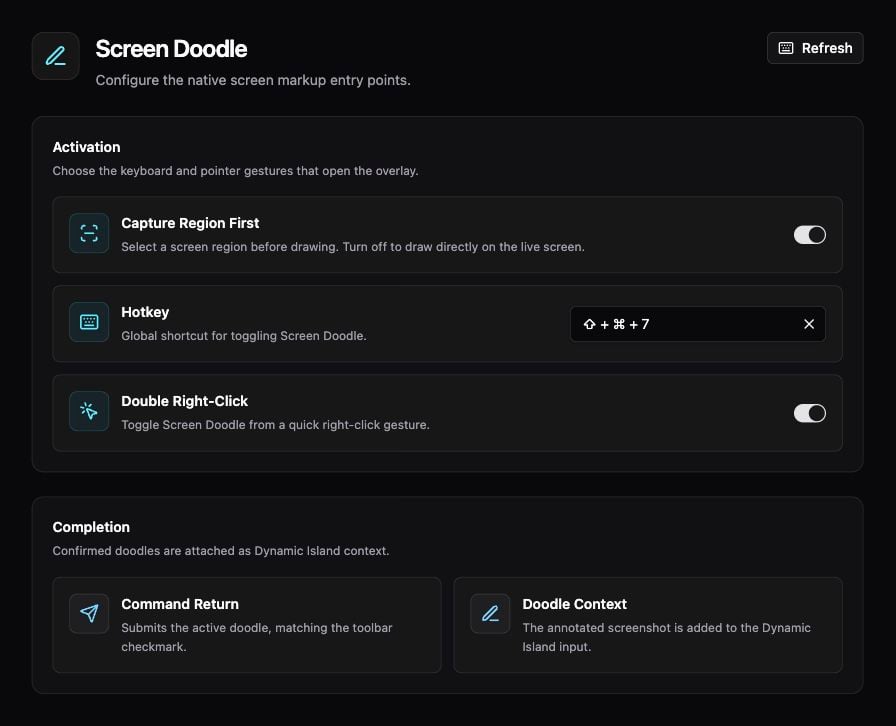
1. Open **Settings → Context → Screen Doodle** and check the **Hotkey**.
2. Bring the content you want to discuss to the front, then invoke Screen Doodle.
3. If **Capture Region First** is enabled, select the region to capture. Otherwise, draw directly over the live screen.
4. Use the overlay's drawing controls to mark the relevant area.
5. Click the checkmark or press **Command + Return** to confirm.
6. In the Dynamic Island, review the attached image and type a request, such as “What does the highlighted warning mean?”
## Activation settings
| Setting | Behavior |
| -------------------- | ----------------------------------------------------- |
| Capture Region First | Select a region before drawing |
| Hotkey | Open or toggle the overlay from the keyboard |
| Double Right-Click | Toggle Screen Doodle with a quick right-click gesture |
If the overlay does not open, check the configured shortcut and [macOS permissions](/configuration/permissions). If you only need the whole app window, use [Appshots](/features/appshots).
See [Dynamic Island](/features/dynamic-island) for the conversation that receives your annotation.
## Mark up your screen
1. Open **Settings → Context → Screen Doodle** and check the **Hotkey**.
2. Bring the content you want to discuss to the front, then invoke Screen Doodle.
3. If **Capture Region First** is enabled, select the region to capture. Otherwise, draw directly over the live screen.
4. Use the overlay's drawing controls to mark the relevant area.
5. Click the checkmark or press **Command + Return** to confirm.
6. In the Dynamic Island, review the attached image and type a request, such as “What does the highlighted warning mean?”
## Activation settings
| Setting | Behavior |
| -------------------- | ----------------------------------------------------- |
| Capture Region First | Select a region before drawing |
| Hotkey | Open or toggle the overlay from the keyboard |
| Double Right-Click | Toggle Screen Doodle with a quick right-click gesture |
If the overlay does not open, check the configured shortcut and [macOS permissions](/configuration/permissions). If you only need the whole app window, use [Appshots](/features/appshots).
See [Dynamic Island](/features/dynamic-island) for the conversation that receives your annotation.