> ## Documentation Index
> Fetch the complete documentation index at: https://docs.enconvo.ai/llms.txt
> Use this file to discover all available pages before exploring further.
# Quick Capture
> Save the current app content to a knowledge base.
Quick Capture saves the current app's content for later retrieval. Appshots attaches an app window to the current request; Quick Capture creates a knowledge-base item.
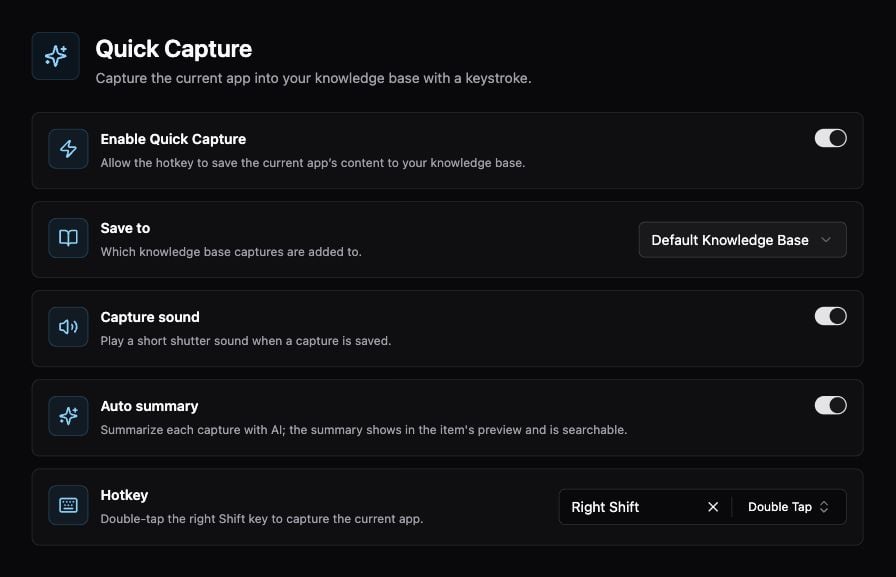 ## Capture something worth keeping
1. Open **Settings → Memory → Quick Capture** and enable it.
2. Choose **Save to**, then review the **Hotkey**.
3. Bring the app containing the content to the front.
4. Invoke the hotkey.
5. Open the destination knowledge base and check the saved item.
## Options
| Setting | Use |
| ------------- | ------------------------------------------------------ |
| Save to | Destination knowledge base |
| Capture sound | Audible confirmation of capture |
| Auto summary | Create an AI summary for the item's preview and search |
| Hotkey | Keyboard gesture that captures the current app |
Auto summary uses AI processing; review your model/provider configuration if you want to control where captured content is processed.
## Troubleshooting
For missing or incomplete content, check [Permissions](/configuration/permissions), return to the intended app, and try a small, clearly visible example. Check the destination before assuming a capture was lost. Indexing and summary generation can finish after the initial capture.
Related: [Knowledge Base](/ai/knowledge-base), [Appshots](/features/appshots), [Voice Notes](/features/voice-notes).
## Capture something worth keeping
1. Open **Settings → Memory → Quick Capture** and enable it.
2. Choose **Save to**, then review the **Hotkey**.
3. Bring the app containing the content to the front.
4. Invoke the hotkey.
5. Open the destination knowledge base and check the saved item.
## Options
| Setting | Use |
| ------------- | ------------------------------------------------------ |
| Save to | Destination knowledge base |
| Capture sound | Audible confirmation of capture |
| Auto summary | Create an AI summary for the item's preview and search |
| Hotkey | Keyboard gesture that captures the current app |
Auto summary uses AI processing; review your model/provider configuration if you want to control where captured content is processed.
## Troubleshooting
For missing or incomplete content, check [Permissions](/configuration/permissions), return to the intended app, and try a small, clearly visible example. Check the destination before assuming a capture was lost. Indexing and summary generation can finish after the initial capture.
Related: [Knowledge Base](/ai/knowledge-base), [Appshots](/features/appshots), [Voice Notes](/features/voice-notes).