> ## Documentation Index
> Fetch the complete documentation index at: https://docs.enconvo.ai/llms.txt
> Use this file to discover all available pages before exploring further.
# Appshots
> Attach the frontmost app window to an AI conversation.
Appshots captures the frontmost external app window as context for your next request. Use it when you want to ask about something visible without saving it to a knowledge base.
## Capture an app
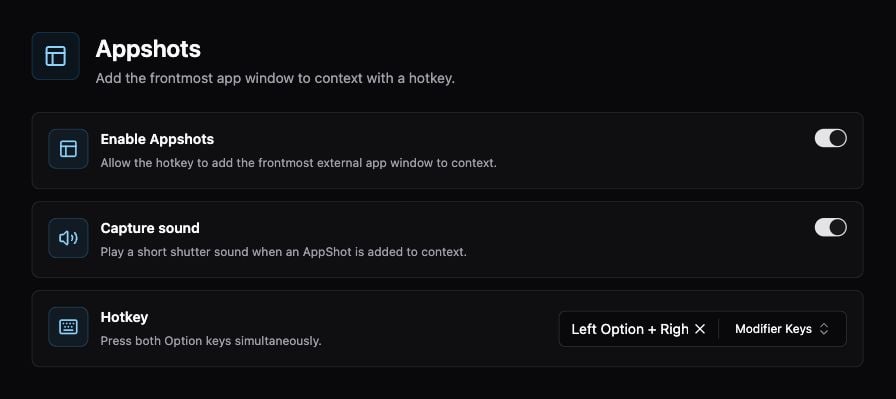
1. Open **Settings → Context → Appshots** and enable **Appshots**.
2. Check the configured **Hotkey**. The settings page explains how to press it; modifier-key gestures and ordinary shortcuts are configurable.
3. Bring the app you want to discuss to the front and press that hotkey.
4. Review the attached context in Enconvo, then ask a specific question such as “Explain the error in this window.”
 ## Choose the right capture tool
| Goal | Use |
| ----------------------------------------------- | ---------------------------------------- |
| Ask about the current app window | Appshots |
| Draw attention to a region before asking | [Screen Doodle](/features/screen-doodle) |
| Save the current app's content for later search | [Quick Capture](/features/quick-capture) |
| Extract text from an image | [OCR](/ai/ocr) |
**Capture sound** controls the shutter feedback. A sound alone is not a substitute for checking the attachment before submitting.
## If no context appears
Check **Settings → Permissions**, especially Screen Recording and Accessibility. Bring the target app forward again; Appshots is intended to capture an external app, not Enconvo's own settings. If a shortcut conflicts with another app, change it in Appshots settings.
Captured content can be sent to the model you use for the request. See [Context Awareness](/features/context-awareness) for choosing context sources.
## Choose the right capture tool
| Goal | Use |
| ----------------------------------------------- | ---------------------------------------- |
| Ask about the current app window | Appshots |
| Draw attention to a region before asking | [Screen Doodle](/features/screen-doodle) |
| Save the current app's content for later search | [Quick Capture](/features/quick-capture) |
| Extract text from an image | [OCR](/ai/ocr) |
**Capture sound** controls the shutter feedback. A sound alone is not a substitute for checking the attachment before submitting.
## If no context appears
Check **Settings → Permissions**, especially Screen Recording and Accessibility. Bring the target app forward again; Appshots is intended to capture an external app, not Enconvo's own settings. If a shortcut conflicts with another app, change it in Appshots settings.
Captured content can be sent to the model you use for the request. See [Context Awareness](/features/context-awareness) for choosing context sources.