> ## Documentation Index
> Fetch the complete documentation index at: https://docs.enconvo.ai/llms.txt
> Use this file to discover all available pages before exploring further.
# AI Commands
> Save a prompt as a reusable command.
An AI Command packages a repeated prompt with its model and settings. Use one for a focused operation such as rewriting a support reply; use an [Agent](/ai/agents) for broader work with tools, or a [Workflow](/workflows/introduction) for a sequence of steps.
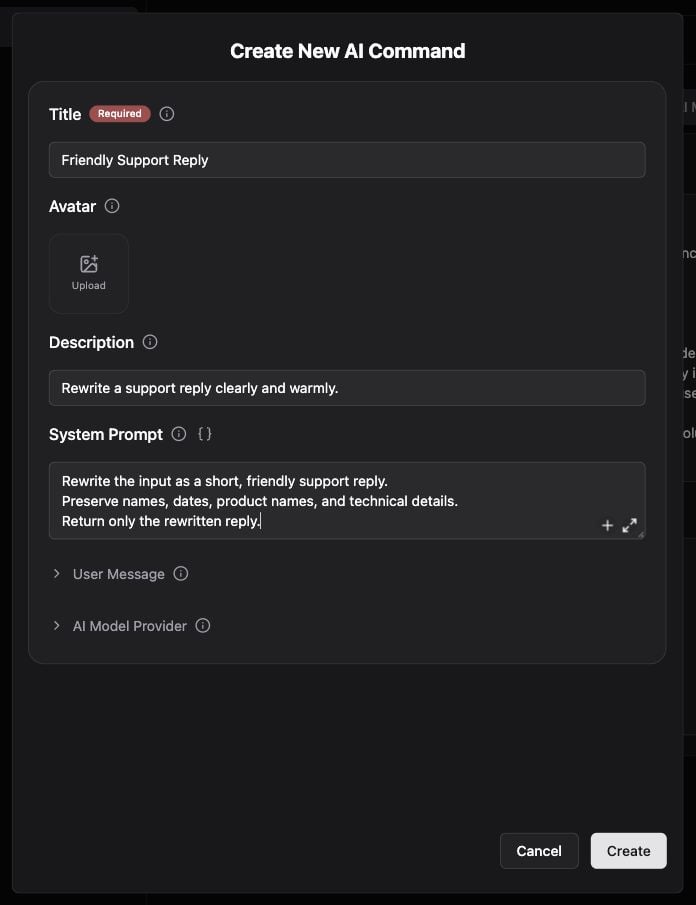 ## Create a command
1. Open **Settings → AI Commands**, or run **Create AI Command** from SmartBar.
2. Give it a recognizable title and an instruction describing the input and desired output.
3. Choose the AI model and other options shown in the editor. Use the global model when you want the command to follow your general model preference.
4. Save it, then find the command by name in SmartBar.
5. Test with a short sample and refine the prompt based on the result.
Example instruction:
```text theme={null}
Rewrite the input as a short, friendly support reply.
Preserve names, dates, product names, and technical details.
Return only the rewritten reply.
```
## Use changing context
Where a field supports variables, use the variable picker to include input text, selected text, the active app, or other context. See [Variables](/workflows/variables). Inspect the expanded context before using a command with private documents.
## Maintain commands
Revisit the command's settings when changing its model, prompt, or shortcut. **More → Reset configuration**, where available, restores defaults after confirmation; read the prompt before resetting a customized command.
If a command is missing, check that it was saved and search its title. If output ignores selected text, review the input/context settings and Accessibility permission.
## Create a command
1. Open **Settings → AI Commands**, or run **Create AI Command** from SmartBar.
2. Give it a recognizable title and an instruction describing the input and desired output.
3. Choose the AI model and other options shown in the editor. Use the global model when you want the command to follow your general model preference.
4. Save it, then find the command by name in SmartBar.
5. Test with a short sample and refine the prompt based on the result.
Example instruction:
```text theme={null}
Rewrite the input as a short, friendly support reply.
Preserve names, dates, product names, and technical details.
Return only the rewritten reply.
```
## Use changing context
Where a field supports variables, use the variable picker to include input text, selected text, the active app, or other context. See [Variables](/workflows/variables). Inspect the expanded context before using a command with private documents.
## Maintain commands
Revisit the command's settings when changing its model, prompt, or shortcut. **More → Reset configuration**, where available, restores defaults after confirmation; read the prompt before resetting a customized command.
If a command is missing, check that it was saved and search its title. If output ignores selected text, review the input/context settings and Accessibility permission.