> ## Documentation Index
> Fetch the complete documentation index at: https://docs.enconvo.ai/llms.txt
> Use this file to discover all available pages before exploring further.
# Notifications
> Choose how Enconvo tells you an Agent has finished.
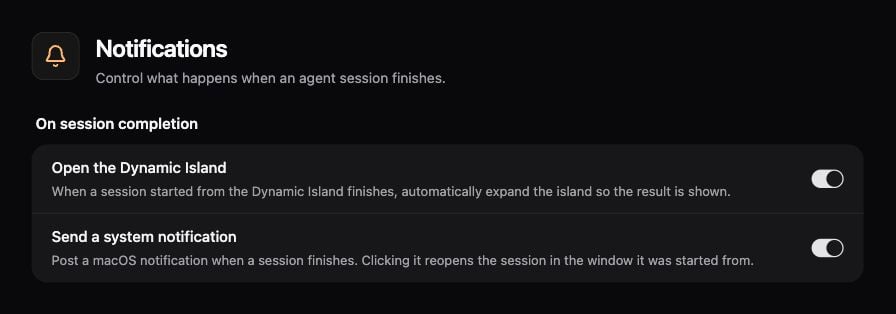
Open **Settings → Agents → Notifications** to control what happens when an Agent session finishes.
| Setting | Result |
| -------------------------- | --------------------------------------------------------------------- |
| Open the Dynamic Island | Automatically expand the island when a session started there finishes |
| Send a system notification | Post a macOS notification when a session finishes |
Clicking a completion notification reopens the session in the window it started from.
 ## Configure notifications
1. Open the Notifications page and review the permission notice.
2. If needed, allow Enconvo notifications in macOS.
3. Set the two completion controls independently.
4. Start a short Agent request and check the result when it finishes.
macOS Focus and notification settings can suppress banners even when Enconvo's setting is enabled.
## Scheduled results
A system notification is different from sending a scheduled result to Telegram or another IM chat. Configure result delivery in the [Scheduled Jobs](/workflows/scheduled-jobs) editor. Check the run history for both execution and delivery status.
## Configure notifications
1. Open the Notifications page and review the permission notice.
2. If needed, allow Enconvo notifications in macOS.
3. Set the two completion controls independently.
4. Start a short Agent request and check the result when it finishes.
macOS Focus and notification settings can suppress banners even when Enconvo's setting is enabled.
## Scheduled results
A system notification is different from sending a scheduled result to Telegram or another IM chat. Configure result delivery in the [Scheduled Jobs](/workflows/scheduled-jobs) editor. Check the run history for both execution and delivery status.